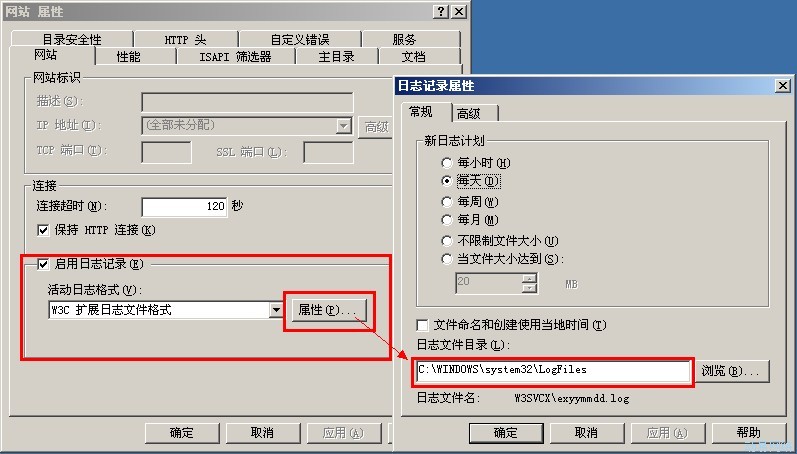
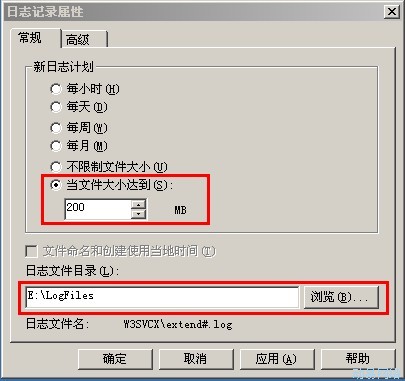
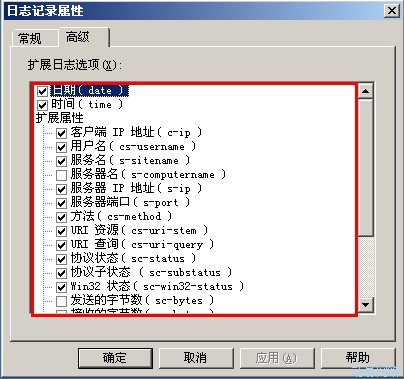
问题: 访问网站首页时出错: “/”应用程序中的服务器错误。-------------------------------------------------------------------------------- 未能加载文件或程序集“AjaxControlToolkit”或它的某一个依赖项。磁盘空间不足。 (异常来自 HRESULT:0x80070070) 说明: 执行当前 Web 请求期间,出现未处理的异常。请检查堆栈跟踪信息,以了解有关该错误以及代码中导致错误的出处的详细信息。 异常详细信息: System.IO.FileLoadException: 未能加载文件或程序集“AjaxControlToolkit”或它的某一个依赖项。磁盘空间不足。 (异常来自 HRESULT:0x80070070) 源错误: 执行当前 Web 请求期间生成了未处理的异常。可以使用下面的异常堆栈跟踪信息确定有关异常原因和发生位置的信息。 程序集加载跟踪: 下列信息有助于确定程序集“AjaxControlToolkit”无法加载的原因。 警告: 程序集绑定日志记录被关闭。要启用程序集绑定失败日志记录,请将注册表值 [HKLMSoftwareMicrosoftFusion!EnableLog] (DWORD)设置为 1。注意: 会有一些与程序集绑定失败日志记录关联的性能损失。要关闭此功能,请移除注册表值 [HKLMSoftwareMicrosoftFusion!EnableLog]。 堆栈跟踪: [FileLoadException: 未能加载文件或程序集“AjaxControlToolkit”或它的某一个依赖项。磁盘空间不足。 (异常来自 HRESULT:0x80070070)] [FileLoadException: 未能加载文件或程序集“AjaxControlToolkit, Version=1.0.10301.0, Culture=neutral, PublicKeyToken=28f01b0e84b6d53e”或它的某一个依赖项。磁盘空间不足。 (异常来自 HRESULT:0x80070070)] System.Reflection.Assembly._nLoad(AssemblyName fileName, String codeBase, Evidence assemblySecurity, Assembly locationHint, StackCrawlMark& stackMark, Boolean throwOnFileNotFound, Boolean forIntrospection) +0 System.Reflection.Assembly.nLoad(AssemblyName fileName, String codeBase, Evidence assemblySecurity, Assembly locationHint, StackCrawlMark& stackMark, Boolean throwOnFileNotFound, Boolean forIntrospection) +43 System.Reflection.Assembly.InternalLoad(AssemblyName assemblyRef, Evidence assemblySecurity, StackCrawlMark& stackMark, Boolean forIntrospection) +127 System.Reflection.Assembly.InternalLoad(String assemblyString, Evidence assemblySecurity, StackCrawlMark& stackMark, Boolean forIntrospection) +142 System.Reflection.Assembly.Load(String assemblyString) +28 System.Web.Configuration.CompilationSection.LoadAssemblyHelper(String assemblyName, Boolean starDirective) +46 [ConfigurationErrorsException: 未能加载文件或程序集“AjaxControlToolkit, Version=1.0.10301.0, Culture=neutral, PublicKeyToken=28f01b0e84b6d53e”或它的某一个依赖项。磁盘空间不足。 (异常来自 HRESULT:0x80070070)] …… --------------------------------------------------------------------------------版本信息: Microsoft .NET Framework 版本:2.0.50727.3603; ASP.NET 版本:2.0.50727.3614 解决问题思路:出现“磁盘空间”这样的提示,一般都是日志文件增长太快而把磁盘空间给占用了。 解决问题的方法: 1、确保网站能正常运行,先把日志文件给清除。操作如下: (1)、打开IIS,右击网站>>“属性”,如图: (2)找出日志所在的位置,把无用的日志文件给清除,注:删除前做好备份! 2、为了预防日志文件增太快而再次出现同样的问题,在这里,我们设置一下IIS的文件增加及把日志文件搬出C盘,同时修改IIS日志记录选项,只有这样才能让服务器更好的运行下去。操作如下图: (1)修改IIS的文件增加及把日志文件搬出C盘: (2)设置IIS记录项(这里要根据自己的需求做记录,下图是默认选项):