
\r\n

\r\n
\r\n

\r\n
 下面是该标签的代码:
\r\n

\r\n
 
\r\n

\r\n
    
\r\n

\r\n
      
\r\n

\r\n
        标题
\r\n

\r\n
        
\r\n

\r\n
          标题
\r\n

\r\n
          关键字
\r\n

\r\n
        
\r\n

\r\n
      
\r\n

\r\n
      
\r\n

\r\n
       
\r\n

\r\n
    
\r\n

\r\n
(function($){
\r\n

\r\n
 $(\"#searchSel\").hover(function(){ $(this).addClass(\"searchSelOn\").find(\"ul\").show()},function(){ $(this).removeClass(\"searchSelOn\").find(\"ul\").hide() });
\r\n

\r\n
 
\r\n

\r\n
 $(\"#searchSel li\").hover(function(){$(this).addClass(\"on\")},function(){$(this).removeClass(\"on\")});
\r\n

\r\n
 $(\"#searchSel li\").click(function(){ 
\r\n

\r\n
$(\"#searchSel h3\").text($(this).text()); 
\r\n

\r\n
$(\"#searchSel h3\").attr(\"op\",$(this).attr(\"op\"));
\r\n

\r\n
$(\"#searchSel ul\").hide();
\r\n

\r\n
 });
\r\n

\r\n
 $(\"#tit_keyword\").focus( function(){$(this).val(\"\"); $(this).css(\"color\",\"#333\")} );
\r\n

\r\n
 $(\"#tit_keyword\").keydown(function(e){if(e.which == 13){gSearch();}});//回车搜索
\r\n

\r\n
})(jQuery);
\r\n

\r\n

\r\n
function gSearch(){
\r\n

\r\n
var o = jQuery(\"#searchSel h3\").attr(\"op\");
\r\n

\r\n
    var k=escape(jQuery(\"#tit_keyword\").val());
\r\n

\r\n
var s = \"\";
\r\n

\r\n
if( k==\"\" ){ alert(\"请输入关键词\");}
\r\n

\r\n
else
\r\n

\r\n
{
\r\n

\r\n
if( o==\"title\" ){ s=\"search.aspx?searchtype=0&fieldoption=title&Keyword=\"+k;}
\r\n

\r\n
if( o==\"keyword\" ){ s = \"search.aspx?searchtype=0&fieldoption=keyword&Keyword=\"+k;}
\r\n

\r\n
window.location = \"/\"+s;
\r\n

\r\n
}
\r\n

\r\n
}
\r\n

\r\n
\r\n

\r\n
这里是上面截图的css样式:对应的风格css下载
\r\n

\r\n
这个搜索的您可以添加多个你想要的搜索项,就好像关键字这个选项一样加上去就可以了,当然还要对这个要显示搜索结果的全站搜索标签进行修改一下,根据不同的fieldoption来在对应的字段里面进行判断筛选信息。
\r\n

", "copyrightHolder": "本站原创" }

全站搜索样式标签分享

来源:本站原创 点击数: 发布时间:2011年12月07日
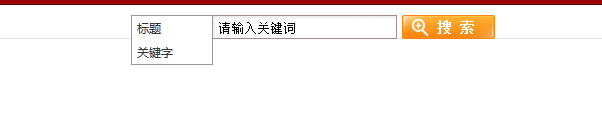
对于全站搜索,一般都只是在输入一个关键字,然后就按照这个关键字来搜索全站带有该标题关键字的信息,那么如果要实现文章的关键字或者是文章的作者等这些字段的搜索就显示十分不方便了,所以下面就给大家提供一个比较方便的首页全站搜索,该标签的搜索样式是这样的:


网页的头部head要引用好系统默认的两个js:

 下面是该标签的代码:


        标题


          标题

          关键字


(function($){

 $("#searchSel").hover(function(){ $(this).addClass("searchSelOn").find("ul").show()},function(){ $(this).removeClass("searchSelOn").find("ul").hide() });


 $("#searchSel li").hover(function(){$(this).addClass("on")},function(){$(this).removeClass("on")});

 $("#searchSel li").click(function(){ 

$("#searchSel h3").text($(this).text()); 

$("#searchSel h3").attr("op",$(this).attr("op"));

$("#searchSel ul").hide();

 });

 $("#tit_keyword").focus( function(){$(this).val(""); $(this).css("color","#333")} );

 $("#tit_keyword").keydown(function(e){if(e.which == 13){gSearch();}});//回车搜索

})(jQuery);

function gSearch(){

var o = jQuery("#searchSel h3").attr("op");

    var k=escape(jQuery("#tit_keyword").val());

var s = "";

if( k=="" ){ alert("请输入关键词");}

else

{

if( o=="title" ){ s="search.aspx?searchtype=0&fieldoption=title&Keyword="+k;}

if( o=="keyword" ){ s = "search.aspx?searchtype=0&fieldoption=keyword&Keyword="+k;}

window.location = "/"+s;

}

}

这里是上面截图的css样式:对应的风格css下载

这个搜索的您可以添加多个你想要的搜索项,就好像关键字这个选项一样加上去就可以了,当然还要对这个要显示搜索结果的全站搜索标签进行修改一下,根据不同的fieldoption来在对应的字段里面进行判断筛选信息。