
webfuture 产品 Antiforgery 非 SSL 请求报错问题解决
问题描述:
网站前后台原本都是设置https访问的,现在后台要设置为内网IP访问,并且改为http协议。网站设置好之后访问报错如下:
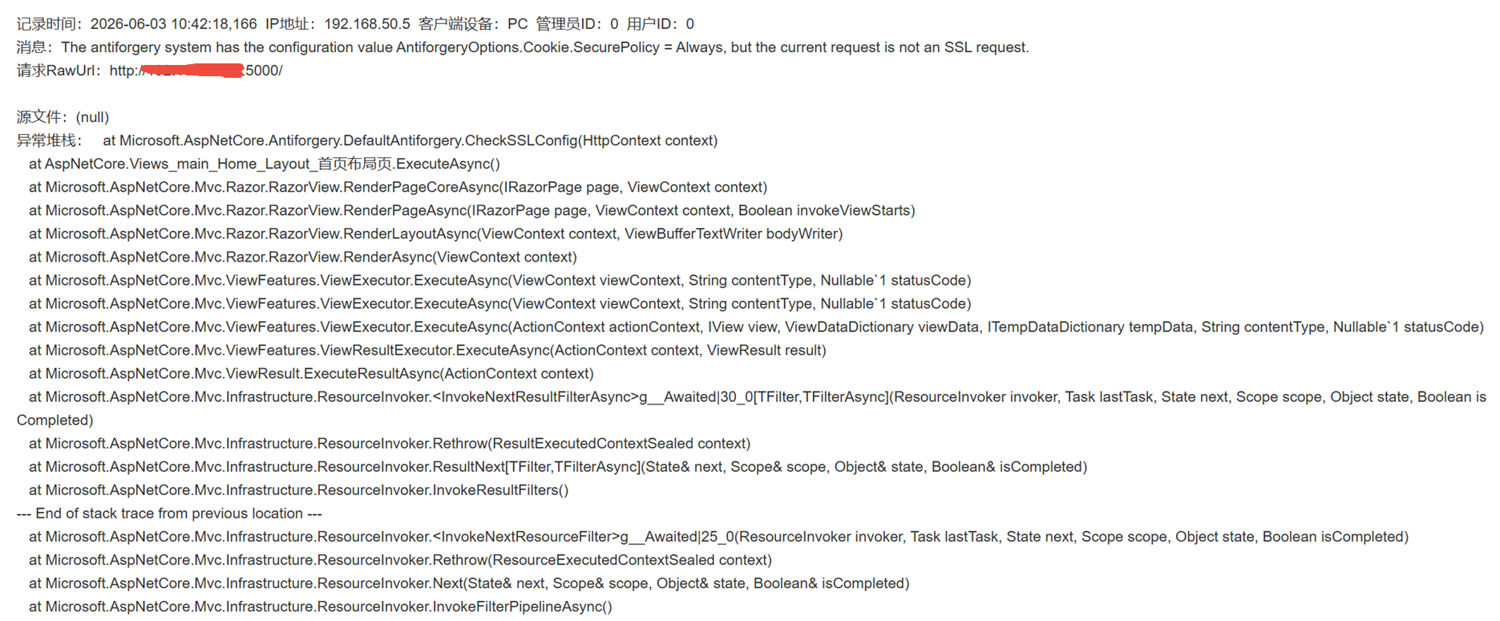
原因分析:
通过在服务器终端执行 ,curl -v http://127.0.0.1:5000 本地原生 HTTP 访问,返回 Cookie 依旧带 secure,如下:
Set-Cookie: .PowerSession=xxx; path=/; secure; samesite=strict; httponly
排除 WAF、前端代理问题,就是程序底层 Antiforgery 硬编码:Cookie.SecurePolicy = Always,和外网环境无关。
问题解决:
编辑 Config / Site.config,在<SiteConfig>标签内加一行
<AntiforgeryCookieSecure>SameAsRequest</AntiforgeryCookieSecure>
例如下:
<SiteConfig> <ApplicationName>网站群平台</ApplicationName> <IsForegroundUseNginx>false</IsForegroundUseNginx> <Scheme>http</Scheme> <Domain>xxx.cc,192.168.0.100</Domain> <Port>80</Port> <!--新增下面这一行--> <AntiforgeryCookieSecure>SameAsRequest</AntiforgeryCookieSecure> <ForegroundNginxScheme>http</ForegroundNginxScheme> ......
重启网站服务
重启后再次 curl 测试:Cookie 里 不再出现 secure 字段
原
Antiforgery非SSL请求报错直接消失,再次通过IP访问网站恢复正常,问题解决